


Coordination can get messy if these separated teams have to work and communicate with fragmented tools.
UCaaS, or Unified Communications as a Service, is a connected cloud platform for business communication and collaboration. So, no matter when or where an employee is working from, they stay in touch with their team and can offer their skills whenever needed.
What Is UCaaS?
UCaaS is a cloud delivery model in which a provider hosts and manages communication software and the infrastructure behind it. Businesses access the platform through a subscription instead of buying, installing, and maintaining the systems themselves.
Think of it as one shared communications workspace where employees can access:
- Business calling and voicemail
- Direct and team messaging
- Audio and video meetings
- Presence and availability
- Screen sharing and file collaboration
- Browser and mobile access
- Integrations with business tools
Picture an account manager on a Tuesday morning. She checks who's online, messages a colleague about a renewal and turns the thread into a call once the questions pile up. Later she joins a customer meeting, presents the proposal, and connects them to relevant people in the one platform.
Not once did she have to switch tools, and every step kept the context of the one before it. While the feature list is important, the real value comes from the connection between channels.
Capabilities differ among providers and plans, so two platforms both labeled UCaaS can behave quite differently.
How UCaaS Works
The provider runs everything behind the screen:
- Hosting
- Software updates
- Service maintenance
- Capacity
- Security updates
- Communication infrastructure
At the voice layer, UCaaS typically uses VoIP (Voice over Internet Protocol) to carry business calls over an internet connection instead of relying on traditional phone infrastructure. UCaaS builds on that voice foundation by putting calling alongside other communication features.
A single platform can bring together business calling, internal messaging, presence, voicemail and, depending on the provider and product scope, video meetings and screen sharing.
A business identity can follow each employee from device to device. That identity usually carries:
- Profile and contacts
- Presence and permissions
- Business number or extension
- Voicemail
- Communication history
UCaaS platforms can also connect their communication functions to the software a business already uses through APIs and third-party integrations. Depending on the provider, that might include a CRM, help desk, analytics platform, or other business system.
Presence helps people choose the right channel at the right time. An available status invites a quick call, a meeting status points toward a message, and do-not-disturb means the question can wait.
Core UCaaS Features
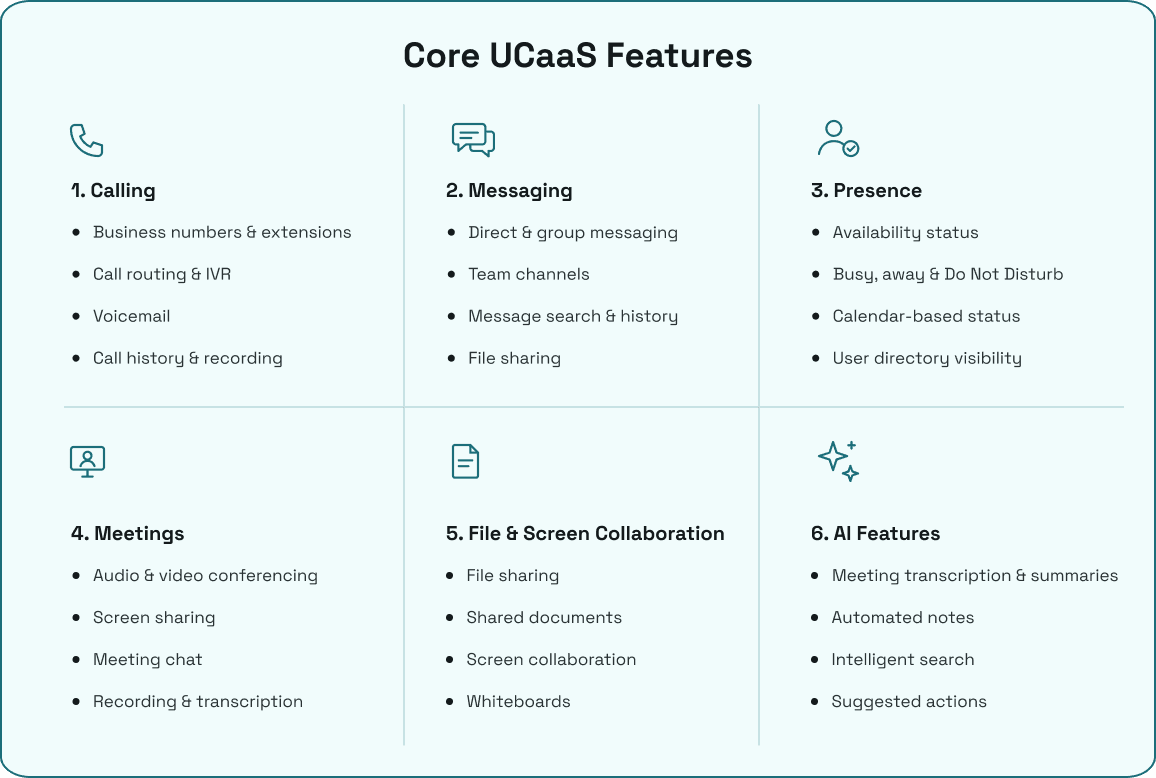
Most platforms group their tools into six areas. Each one matters more when it connects to the others.
Calling
Calling is one channel inside the platform, covering voice communication within the company and outside it. Expect business numbers, extensions, inbound and outbound calls, transfers, conference calling, voicemail, call history, call routing, IVR, recordings, and call notes. External calling reaches customers and partners on ordinary phone numbers.
Messaging
Messaging handles everyday coordination and keeps quick questions out of overloaded inboxes. It includes direct messages, group and team messaging, conversation history, search, notifications and file attachments. A message can also escalate to a call or meeting when typing stops being efficient.
Presence
Presence tells colleagues whether you can talk right now. It covers availability status, modes such as busy, away, meeting and do-not-disturb, directory visibility, calendar-based presence and device or application status.
Meetings
Meetings cover audio and video sessions, including external participants. Common tools are meeting chat, screen sharing, recording, transcription and summaries, with breakout rooms or whiteboards where supported.
File and screen collaboration
This is where people work on the same material together. It includes file sharing, shared documents, screen collaboration, whiteboards and links to productivity platforms, with sharing permissions and retention controls where available.
AI features
AI adds automation on top of the channels above: transcription, summaries, automated notes, suggested actions, intelligent search, sentiment analysis and intelligent routing. What you get depends on the provider, the plan, the accuracy of the output and the data policy behind it.
UCaaS Benefits
UCaaS offers various benefits for teams looking to make their communications more efficient. Less tools and a unified workspace is just the start, here is how UCaaS improves business communication:
More Connected Employee Communication
Messaging, meetings, calls and collaboration tools live in one connected environment. A conversation keeps its continuity as it moves from one channel to the next, so nobody has to re-explain the last step.
Faster Collaboration
Presence and messaging help employees find the right person quickly. An issue can start as a quick message and become a meeting or call the moment it needs one.
Support for Hybrid Work
Employees can reach the platform from the office, home, a branch or a mobile device. They keep the same business identity and the same communication experience wherever they are.
Simpler Administration
Users, teams, policies, permissions, settings and reporting are managed centrally. That means one place to change things rather than several.
Less Infrastructure to Maintain
The provider manages much of the hosted platform, and a subscription replaces much of the upfront hardware spend. Businesses still look after local internet, power, Wi-Fi, devices and user policies.
Cost Saving
As a result of less hardware needed, UCaaS solutions can reduce the upfront cost and replace it with much more affordable subscription fees. Choose a plan according to your needs and everything is ready to go.
Easier to Scale
You do not have to worry about complex scaling procedures as your business grows. UCaaS takes care of your increasing needs by allowing you to add more team members, seats, and locations by just paying the added costs.
Flexible Channel Choice
Employees pick messaging, calls, meetings or file collaboration based on the task. UCaaS doesn't require every task to happen in the same channel; it makes the channels work together.
Limitations and Requirements
UCaaS depends on internet access, local networks, Wi-Fi, power, devices and provider availability. When any one of those falters, the experience suffers. Three network measures explain most voice and video problems:
Latency
The delay between someone speaking and the other person hearing it, which makes conversations feel like a bad satellite link.
Jitter
Uneven timing in how data arrives, which produces choppy audio.
Packet loss
Data that never arrives, which causes dropouts and frozen video.
Before committing, check mobile fallback, provider redundancy, outage communication, and emergency-calling procedures. Advanced capabilities may be limited to specific plans, licenses, regions, or add-ons. A provider might also support a particular CRM, helpdesk, calendar, or productivity platform without supporting every feature or workflow inside it.
Security and Governance
Communication platforms carry customer details, contracts and internal decisions inside conversations, recordings and transcripts. Governance matters as much as features. Look at:
- MFA and SSO
- Role-based access
- Encryption
- Recording permissions and transcript access
- Retention and data residency
- Guest access
- Audit logs
Verify each of these by plan and provider, because they aren't always uniform.
UCaaS vs Related Categories
These terms overlap in conversation, so it helps to pin each one down.
VoIP vs UCaaS
VoIP is technology for carrying voice over IP networks. A UCaaS platform can use it as one building block, but VoIP on its own doesn't automatically include broader collaboration tools.
A basic VoIP service might simply replace a traditional phone line with internet-based calling. It may provide features such as business numbers, call routing, voicemail and extensions without offering messaging, meetings or team collaboration. UCaaS takes that voice capability and puts it alongside other communication channels in one service.
PBX vs UCaaS
PBX is a business telephone-system architecture or function. It manages extensions, call control, routing, transfers, and voicemail. It can be:
- On-premises
- Hosted
- Hybrid or part of a UCaaS platform
A traditional PBX usually focuses on managing an organization's internal and external phone calls. Modern cloud PBX systems move those functions into a hosted environment, removing much of the hardware and maintenance associated with an on-premises system.
UCaaS can include PBX functionality while extending beyond telephony into messaging, meetings, presence and other collaboration features.
CCaaS vs UCaaS
CCaaS is a cloud service for structured customer interactions. It may include queues, agent routing, monitoring, recordings, dispositions and supervisor tools. A CCaaS platform can support channels such as voice, chat, email and sometimes social messaging, depending on the provider.
UCaaS, by comparison, is generally centered on communication and collaboration within the wider organization, although the two can connect and share information in businesses that use both.
Practical UCaaS Use Cases
The value of UCaaS is easier to understand through the communication problems it solves.
Hybrid Collaboration Across Office and Home
Hybrid teams need employees to communicate effectively regardless of where they are working. UCaaS brings presence, messaging, calling, video meetings, screen sharing, and browser or mobile access into the same communication environment, making it easier to choose the right channel for each interaction.
Coordinating Communication Across Branches
Organizations with multiple branches can struggle with separate communication systems, directories, numbers, and routing arrangements. UCaaS can connect locations through shared business numbers, internal messaging, presence, centralized directories, and call routing, allowing employees across branches to communicate through one system.
Sales Follow-Ups
Sales teams often switch between calls, messages, meetings, and customer records during the follow-up process. UCaaS brings calling, messaging, meetings, presence, and mobile access together, while CRM integrations, where supported by the provider, can connect communication activity with customer information.
Customer-Service Escalations
Customer issues often need to move between agents, specialists, or supervisors without losing the context of the conversation. UCaaS and connected contact-center capabilities can support this through call transfers, queues, presence, internal messaging, recordings, and call history, helping route the interaction to the appropriate person or team.
Mobile Employees
Employees working away from a desk still need access to business calling and internal communication. UCaaS can provide mobile apps, browser-based calling, business numbers, messaging, presence, and call history, allowing employees to use supported devices while keeping their business communications connected to the same system.
What to Look For
Start with employee workflows, not vendor feature lists. Then evaluate:
Channel coverage
Check whether the platform covers the communication channels you actually need, including calling, messaging, presence, meetings, screen sharing, mobile access, reporting, and AI features. Avoid paying for channels your teams won't use.
Device and app support
Check the experience across browsers, desktop applications, mobile devices, desk phones, and meeting-room hardware where relevant. Employees should be able to use the communication tools they need without being tied to one device.
Integrations
Check which integrations are native and which depend on third-party tools or APIs. If your teams rely on a CRM, help desk, productivity suite, or other business system, confirm that the UCaaS provider supports the specific integration you need rather than assuming it does.
Security and access controls
Security should cover more than the login screen. Look for features such as encryption, secure authentication, role-based access, SSO where required, audit controls, recording and retention policies, and protections around call and customer data.
Support and onboarding
Check what support is included and how much help is available during setup, number porting, configuration, and troubleshooting. A lower subscription price can become less attractive if the business has to handle most of the implementation itself.
Total cost
Don't compare the advertised monthly rate alone. Check user minimums, plan tiers, included features, additional numbers, international calling, recording storage, AI features, hardware, onboarding, and other charges before calculating the actual cost.
Here is what the cost structure of established UCaaS providers looks like:
| Provider | Published starting price | Published starting plan |
|---|---|---|
| ArcSIP | $69/user/month | ArcSIP Unlimited, a single plan covering the platform's core calling, routing, internal collaboration, business hours, voicemail, and related features. Minimum 3 users. |
| Dialpad | $15/user/month | Connect Standard, billed annually. Pro starts at $25/user/month; Enterprise is custom priced. |
| RingCentral | $19.99/user/month | RingEX Essentials when billed annually. Standard starts at $27.99 and Premium at $34.99 annually. |
| Zoom Phone | $10/user/month | US & Canada metered calling. Unlimited US & Canada starts at $15/user/month. |
| Bell | $27/user/month | Starting plan on the published pricing page, including voice, video, chat, calling, analytics, and integrations. |
UCaaS Migration Checklist
A move to UCaaS goes smoother with a written plan. Work through these steps in order:
- Inventory users, teams, roles, licenses, devices, numbers and existing communication tools, then document call flows, business hours, queues, voicemail, meetings, calendars, files, recordings and integrations.
- Plan SSO, MFA, permissions, retention and access policies.
- Begin number porting early and keep the old service active until it completes.
- Test messaging, presence, meetings, screen sharing, file sharing, calls, transfers, voicemail, mobile access and after-hours behavior.
- Confirm network, Wi-Fi, power, devices and emergency-calling procedures.
- Train employees on channel selection, presence, notifications, meetings, files and calling.
- Use a pilot or phased rollout, and keep documented fallback procedures.
How ArcSIP Approaches UCaaS
ArcSIP is a cloud-based unified communication and voice platform that combines business telephony, contact-center operations, and remote communication in one place. It covers everything a team needs with much more on the way:
- Business calling and phone-number management
- Call routing, IVR, queues, transfers, conferencing and voicemail
- Browser-based WebRTC calling and mobile access
- Call history, call journey, live operations and reporting
- User, team and role-based administration
Administrators can watch live calls across numbers, and the call journey traces each call's path through transfers and fallbacks, with timestamps and reasons.
Explore ArcSIP's business communication and contact-center platform.
Conclusion
UCaaS brings business communication into a shared cloud environment and makes everyday communication easier to manage across employees, locations, devices, and channels.
For businesses considering UCaaS, the decision should come down to how well the platform fits their existing workflows. Look beyond the feature list and consider integrations, security, reliability, device support, migration requirements, and the total cost of running the service.
A good UCaaS platform should solve a communication problem rather than create another layer of software for employees to manage. The right choice is the one that fits the way your teams already work while giving them room to adapt as those needs change.